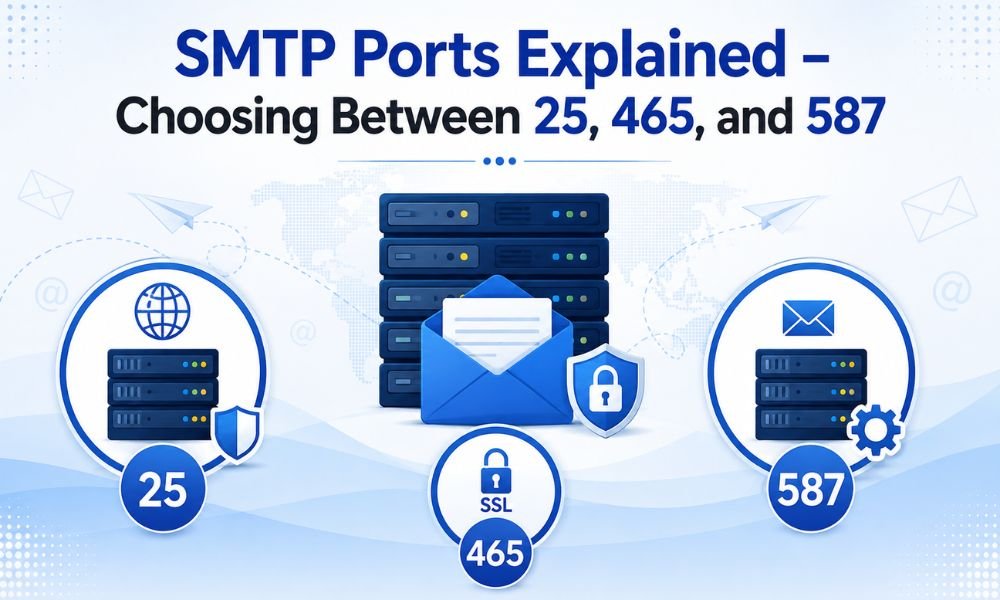
Choosing the right SMTP port can make a significant difference when configuring an email server, business mailbox, application, or bulk email system. The three ports you will encounter most often are 25, 465, and 587, but they are not interchangeable.
While all three can be associated with SMTP, they serve different purposes and use different approaches to email transmission and security. Choosing the wrong port can lead to connection failures, authentication errors, blocked outgoing emails, or unnecessary deliverability problems.
This guide explains SMTP ports 25, 465, and 587, how they work, when to use each one, and which port is generally the best choice for modern email sending.
What Is an SMTP Port?
SMTP, or Simple Mail Transfer Protocol, is the standard protocol used to send email between mail systems. An SMTP port is essentially a network endpoint through which an email client, application, or mail server communicates with an SMTP service.
Think of the SMTP server as a post office and the port as a specific entrance. Different entrances can be designed for different types of traffic.
The important distinction is between mail submission and mail transfer.
- Mail submission is when an email application or website submits an outgoing message to an SMTP server.
- Mail transfer is when mail servers communicate with one another to deliver messages.
This distinction explains why port 25, 465, and 587 should not simply be treated as three versions of the same thing.
SMTP Port 25: Mainly for Server-to-Server Mail Transfer
Port 25 is the traditional SMTP port and is primarily associated with server-to-server email transfer.
When one mail server needs to deliver a message to another mail server, SMTP communication commonly takes place through port 25. For example, an outgoing mail server may look up the recipient domain’s MX records and establish an SMTP connection to the destination mail server.
However, port 25 is generally not the preferred choice for users, websites, or applications submitting email through an authenticated SMTP provider.
One major reason is abuse prevention. Internet service providers and hosting companies may restrict or block outbound connections on port 25 to reduce spam and malicious email traffic.
When should you use port 25?
Port 25 makes sense when:
- Your mail server is performing SMTP relay.
- You operate your own mail transfer infrastructure.
- Your server needs to communicate directly with another mail server.
- Your hosting or network environment specifically permits outbound port 25 traffic.
For ordinary website email, transactional email applications, or authenticated SMTP submission, port 25 is usually not the first choice.
SMTP Port 587: The Standard Choice for Email Submission
Port 587 is widely used for authenticated SMTP message submission.
If you are configuring an email client, WordPress website, CRM, SaaS application, or marketing platform to send messages through an SMTP provider, port 587 is often the recommended option.
Port 587 typically uses STARTTLS, which allows the SMTP connection to upgrade to an encrypted TLS connection before credentials and email data are transmitted.
A typical configuration may look like:
- SMTP Host: Your provider’s SMTP server
- Port: 587
- Encryption: STARTTLS/TLS
- Authentication: Required
- Username: Your SMTP account
- Password/API credential: Provider-specific credential
The important point is that STARTTLS must be successfully negotiated when encryption is required. Simply selecting port 587 does not automatically guarantee secure communication if the client or server is incorrectly configured.
RFC 8314 specifically discusses TLS for email submission and identifies STARTTLS on port 587 as widely deployed. It also recommends moving away from cleartext submission.
Why is port 587 popular?
Port 587 is a strong choice because it was designed for message submission rather than unrestricted server-to-server relay.
It is commonly suitable for:
- Business email applications
- Website SMTP configuration
- Transactional email
- CRM systems
- SaaS applications
- Authenticated email sending
- Marketing platforms
If your SMTP provider recommends 587 with STARTTLS, follow that configuration unless the provider specifically instructs you to use another port.
SMTP Port 465: SMTP Submission With Implicit TLS
Port 465 is another modern option for secure SMTP submission.
The major difference between ports 465 and 587 is how TLS encryption begins.
With port 587, the connection generally starts as an SMTP session and then uses the STARTTLS command to negotiate TLS.
With port 465, TLS starts immediately when the connection is established. This is called implicit TLS.
RFC 8314 formally defines port 465 for the “submissions” service and describes the TLS handshake as beginning immediately. The same RFC notes that correctly configured port 465 implicit TLS and port 587 STARTTLS can provide comparable security when TLS is required before message submission.
A typical port 465 configuration is:
- SMTP Host: Your provider’s SMTP server
- Port: 465
- Encryption: SSL/TLS or implicit TLS
- Authentication: Required
- Username: Your SMTP account
- Password/API credential: Provider-specific credential
Port 465 is therefore not an outdated port that should automatically be avoided. It is a legitimate secure SMTP submission option when supported by your provider.
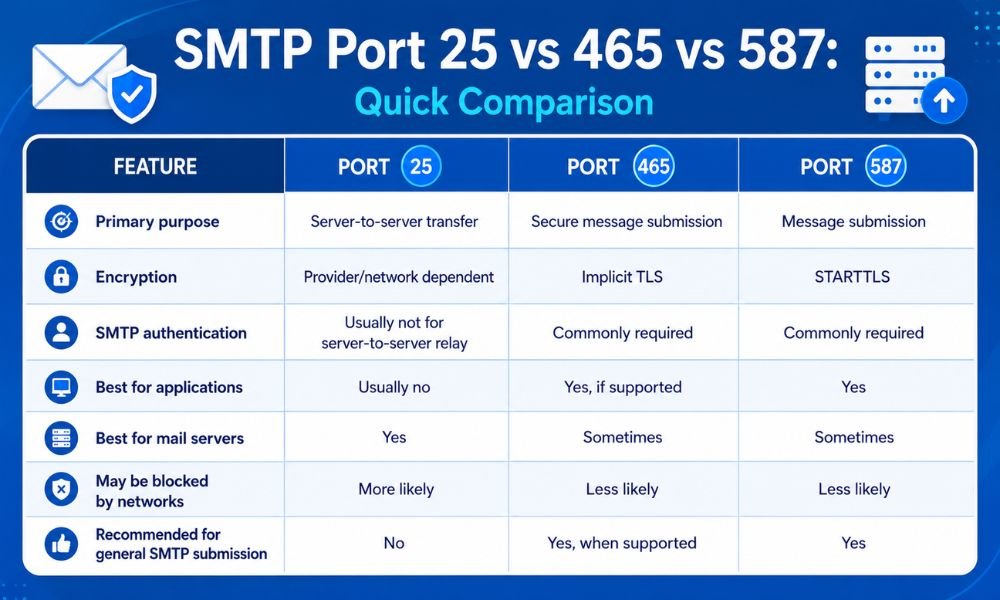
SMTP Port 25 vs 465 vs 587: Quick Comparison
Which SMTP Port Should You Choose?
For most businesses and applications, the decision is straightforward.
Choose port 587 when your SMTP provider recommends STARTTLS and you want a broadly supported standard for authenticated email submission.
Choose port 465 when your SMTP provider specifically supports or recommends implicit TLS.
Choose port 25 when you are operating mail-server infrastructure that needs server-to-server SMTP communication and your network allows it.
The most important rule is to follow your SMTP provider’s documented host, port, encryption, and authentication requirements rather than choosing a port simply because it appears to work.
Does the SMTP Port Affect Email Deliverability?
The SMTP port itself is not a magic deliverability switch.
Using port 587 instead of 465, for example, does not automatically make your emails reach the inbox. Deliverability depends on a much broader set of factors, including sender reputation, authentication, IP reputation, domain reputation, bounce rates, spam complaints, message quality, list hygiene, and recipient engagement.
However, using the correct SMTP submission method helps ensure that your application can authenticate and communicate securely with the sending infrastructure.
If you are experiencing delivery problems, look beyond the port. Check your SPF, DKIM, DMARC configuration, bounce rates, sending reputation, and SMTP response codes.
For example, understanding how to monitor email bounce rates with advanced analytics tools can help you identify whether failed or rejected messages are contributing to broader delivery issues.
Similarly, businesses selecting infrastructure for high-volume campaigns should evaluate the SMTP server’s IP reputation, authentication capabilities, throughput, monitoring, and support rather than focusing on the port alone.
Common SMTP Port Configuration Mistakes
Several SMTP problems are caused by simple configuration errors.
1. Using port 25 for application email
A website or application may fail to send because the hosting provider blocks outbound port 25.
Solution: Try the authenticated submission port recommended by your SMTP provider, commonly 587 or 465.
2. Mixing encryption types
A common mistake is selecting port 465 while configuring STARTTLS, or selecting port 587 while expecting implicit SSL/TLS.
Solution: Match the encryption method to the port:
- 465 → implicit TLS
- 587 → STARTTLS
- 25 → relay configuration depends on the mail-server environment
3. Disabling SMTP authentication
Many SMTP submission services require authentication.
Solution: Use the credentials or API-generated SMTP credentials supplied by your provider.
4. Assuming the port fixes spam problems
Changing from port 25 to 587 will not automatically solve poor deliverability.
Solution: Investigate authentication, reputation, list quality, content, bounce rates, and recipient engagement.
Best Practices for Secure SMTP Configuration
Regardless of the port you choose, follow these practices:
- Use TLS encryption whenever supported.
- Use authenticated SMTP submission for applications and business email.
- Avoid relying on port 25 for routine application sending.
- Keep SMTP credentials secure and never hard-code passwords in publicly accessible code.
- Configure SPF, DKIM, and DMARC for your sending domain.
- Monitor bounces, complaints, and delivery failures.
- Use a reputable SMTP provider with suitable sending infrastructure.
- Check your provider’s documentation before changing ports or encryption settings.
For organizations handling significant email volumes, understanding how to choose the right SMTP server for bulk email campaigns is just as important as selecting the correct SMTP port.
Final Verdict: 25, 465, or 587?
There is no single SMTP port that is best for every situation.
Port 25 remains important for mail-server-to-mail-server SMTP transfer, but it is generally not the preferred option for application-level email submission.
Port 587 is an excellent general-purpose choice for authenticated SMTP submission using STARTTLS and is widely supported by email software and providers.
Port 465 is also a strong choice when your provider supports implicit TLS and specifically recommends it.
The safest approach is simple: use the port and encryption method recommended by your SMTP provider, require secure authentication, and focus on the complete email-delivery setup rather than the port number alone.
When configured correctly, ports 465 and 587 can both provide secure SMTP submission. The real difference is how TLS is established—not simply which number appears in your SMTP settings.